Parent Page
Wobkey Rainy 75 Wireless
| Wireless Connection |
How to switch to |
Signal Lights |
Device |
| Wired |
Function + Tab toggles between dongle (Green) and BT (Blue) and Wired (No Light) when USB wire IS connected. For firmware update. |
No light under F4 Key bit rest of keyboard lights up with rotating rainbow |
NA |
| 2.4 GHZ Dongle |
Function + Tab toggles between dongle (Green) and BT (Blue) when no USB wire is connected. |
Green Indicator under F4 Key for 3 seconds |
blue dongle -> Purple Keyboard. Vermeer - Main Desktop. Appears as Wireless Gaming Keyboard. Does not display Battery Level. Can program VIA. purple dongle -> Blue Keyboard. Clear dongle -> Acrylic keyboard |
| Bluetooth F1 |
Function + Tab toggles between dongle (Green) and BT (Blue) when no USB wire is connected. Then if Not Blue under F1 press Function + F1. |
Blue Indicator under F1 Key for 3 seconds |
Vermeer Main Desktop. Appears as Rainy 75-1. Displays Battery Level. Cannot program VIA. |
| Bluetooth F2 |
Function + Tab toggles between dongle (Green) and BT (Blue) when no USB wire is connected. Then if Not Blue under F2 press Function + F2. |
Blue Indicator under F2 Key for 3 seconds |
Renior 4700g Black TV Computer |
| Bluetooth F3 |
Function + Tab toggles between dongle (Green) and BT (Blue) when no USB wire is connected. Then if Not Blue under F3 press Function + F3. |
Blue Indicator under F3 Key for 3 seconds |
Work Laptop |
Switch Connection Modes
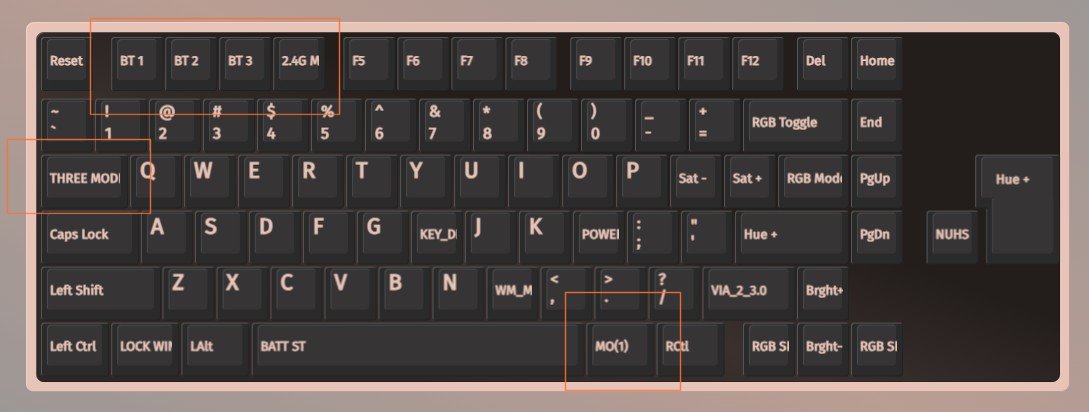
Function + Tab sitches from Wired (ESC Lights up), F1 - F3 Lights up for what bluetooth conneciton you are on, F4 lights up green to inicate we are using 2.4 GHZ dongle connection.
Bluetooth
Bluetooth can report battery level within windows. I can make bluetooth assignments match across all boards.
Bluetooth Device Assigments
- F1 -> Veermeer - Main Desktop
- F2 -> Renior 4700g Black TV Computer
- F3 -> Work Laptop
Bluetooth Pairing
Long Press Function Key + F1/F2/F3 for 3 seconds to assign device. I think we need to be in blue tooth mode for this to work (ie Function + Tab Lights up F1-F3 not F4)
2.4GHZ Dongle
2.4GHZ Dongle cannot display battery level within windows. However we can do VIA programming over it. More reliable than bluetooth on vermeer. Depends on colored dongle.
I painted the dongle blue to match the keyboard color but have since swapped the pp pcb into the purple frame. So blue dongle is now for purple keyboard.
purple dongle is now for blue keyboard. Acrylic keyboard dongle was never colored.
I keep the blue dongle on the vermeer desktop as bluetooth is flakey on that pc. So purple will only work with vermeer over 2.4 GHZ.
2.4GHZ Pairing
It says we can pair to dongle by long pressing Function + F4. Seems to just work for me without needing to pair. Might be needed if switching dongles?
Wireless Must be connected
The only way this keyboard will do anything without being plugged directly into a computer is by turning on the wireless mode.
Remove the Caps Lock Keycap to expose the wireless on/off switch. I will only use this thing in wireless mode.
Once I did this the RGB lights started doing stuff. If you want to run battery level command on board, we must be connected wirelessly first for some reason.