v.2026-04-04
Parent Page
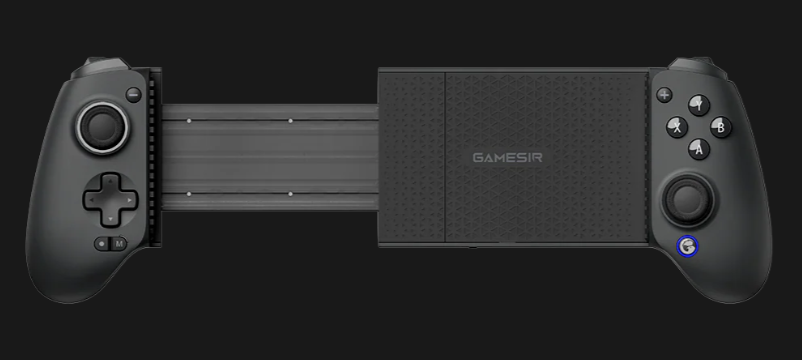
GameSir g8Plus
GameSir x5s
External Links
GameSir web site
Bestbuy 80 bucks 2026-04-14
Manual
Info
Hall effect sticks
Bluetooth 5.3
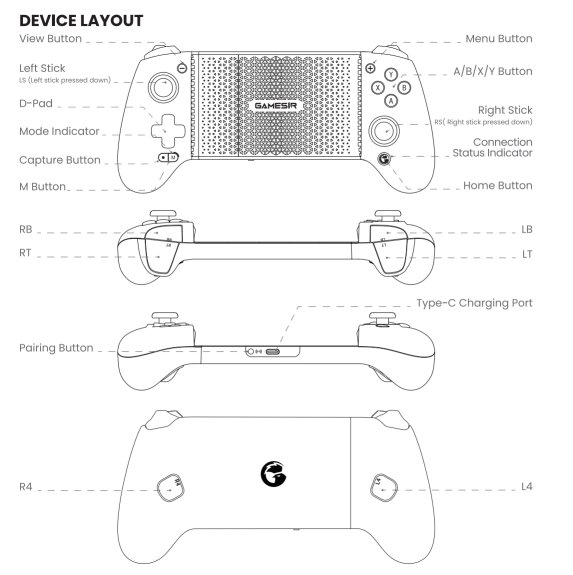
The Logo Button is the pairing button.
840mAh battery
6-axis gyroscope
max device width is 8.39 inches.
Press and hold the Home button (Chicken logo button) to turn on or wake up.
Press and hold the Home button (Chicken logo button) for 10 seconds to turn off.
Pairing Mode: Press and hold the pairing button on the bottom right side for 2 seconds (light will flash yellow)
While charging breathing lighting effect.
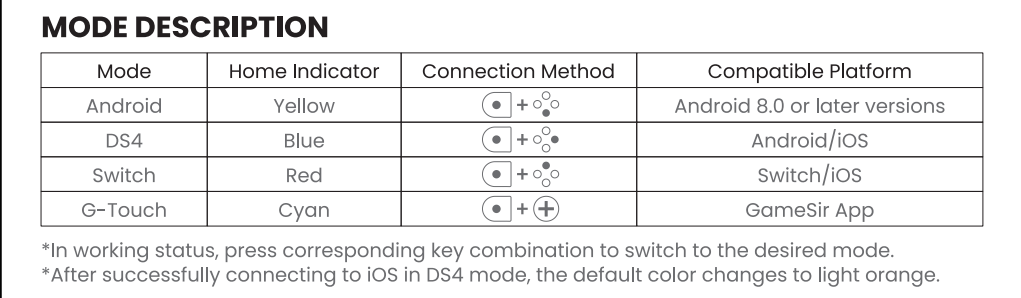
Press and Hold M Button check Mode through chickin color indicator.
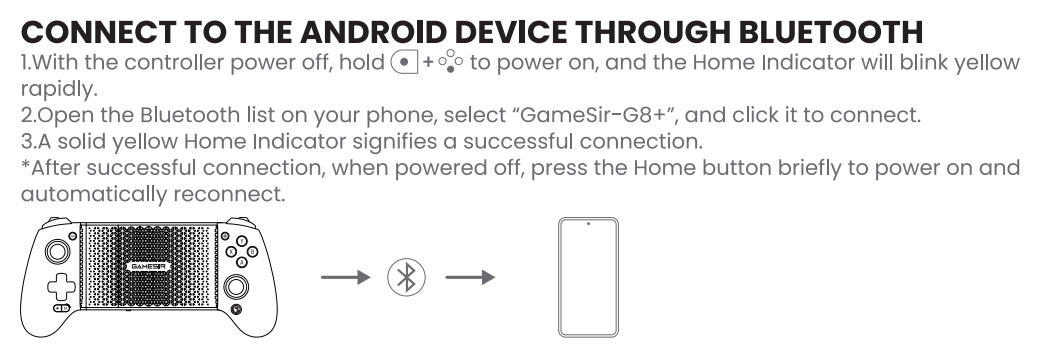
Press and Hold chicken and south until chicken flashes yellow rapidly for android mode
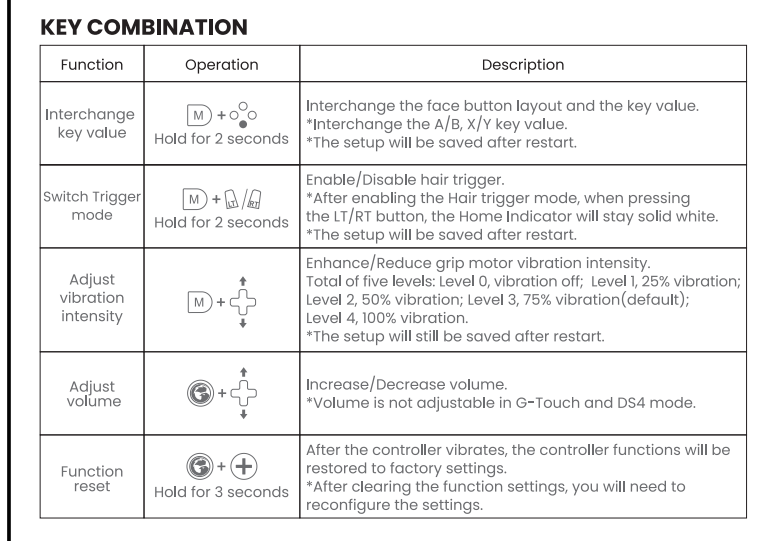
Buttons are swappable, Swapped to eastern snes style
Chicken + D-Pad Up and down controls volume in android
Comes in a nice case.
The case holds the button swap tool.
Also came with different rubber bumpers.
Bluetooth pairing
I can enter android bluetooth pairing mode holding South + Home (Chicken Logo)
If combinations fail, hold the small round Pairing Button next to the USB-C port for 3–5 seconds to force pairing mode.
There is a bluetooth pairing button on bottom left of device
Retroarch Autoconfig
After BT Connection
Start retroarch no core
Press D-Pad
Appears as GameSir-X5s Consumer Control
Make Autoconfig
I copied the file local
RetroArch\autoconfig\android\gamesikre.cfg
I never directly set input_turbo_btn. It was there from auto laod so I assumed it's mapped to m?
input_driver = "android" input_device = "GameSir-X5s Consumer Control" input_vendor_id = "13623" input_product_id = "4377" input_b_btn = "96" input_y_btn = "99" input_select_btn = "109" input_start_btn = "108" input_up_btn = "h0up" input_down_btn = "h0down" input_left_btn = "h0left" input_right_btn = "h0right" input_a_btn = "97" input_x_btn = "100" input_l_btn = "102" input_r_btn = "103" input_l2_btn = "104" input_r2_btn = "105" input_l3_btn = "106" input_r3_btn = "107" input_l_x_plus_axis = "+0" input_l_x_minus_axis = "-0" input_l_y_plus_axis = "+1" input_l_y_minus_axis = "-1" input_r_x_plus_axis = "+2" input_r_x_minus_axis = "-2" input_r_y_plus_axis = "+3" input_r_y_minus_axis = "-3" input_turbo_btn = "106" input_enable_hotkey_btn = "109" # Select input_exit_emulator_btn = "108" # Start + Select input_menu_toggle_btn = "100" # X + Select input_save_state_btn = "103" # R1 + Select input_load_state_btn = "102" # L1 + Select input_b_btn_label = "B" input_y_btn_label = "Y" input_select_btn_label = "Select" input_start_btn_label = "Start" input_a_btn_label = "A" input_x_btn_label = "X" input_l_btn_label = "L1" input_r_btn_label = "R1" input_l2_btn_label = "L2" input_r2_btn_label = "R2" input_l3_btn_label = "Left Thumb" input_r3_btn_label = "Right Thumb" input_l_x_plus_axis_label = "Left Analog Right" input_l_x_minus_axis_label = "Left Analog Left" input_l_y_plus_axis_label = "Left Analog Up" input_l_y_minus_axis_label = "Left Analog Down" input_r_x_plus_axis_label = "Right Analog Right" input_r_x_minus_axis_label = "Right Analog Left" input_r_y_plus_axis_label = "Right Analog Up" input_r_y_minus_axis_label = "Right Analog Down"
Connection Modes
Advanced Button Combos
Labels