Parent Page
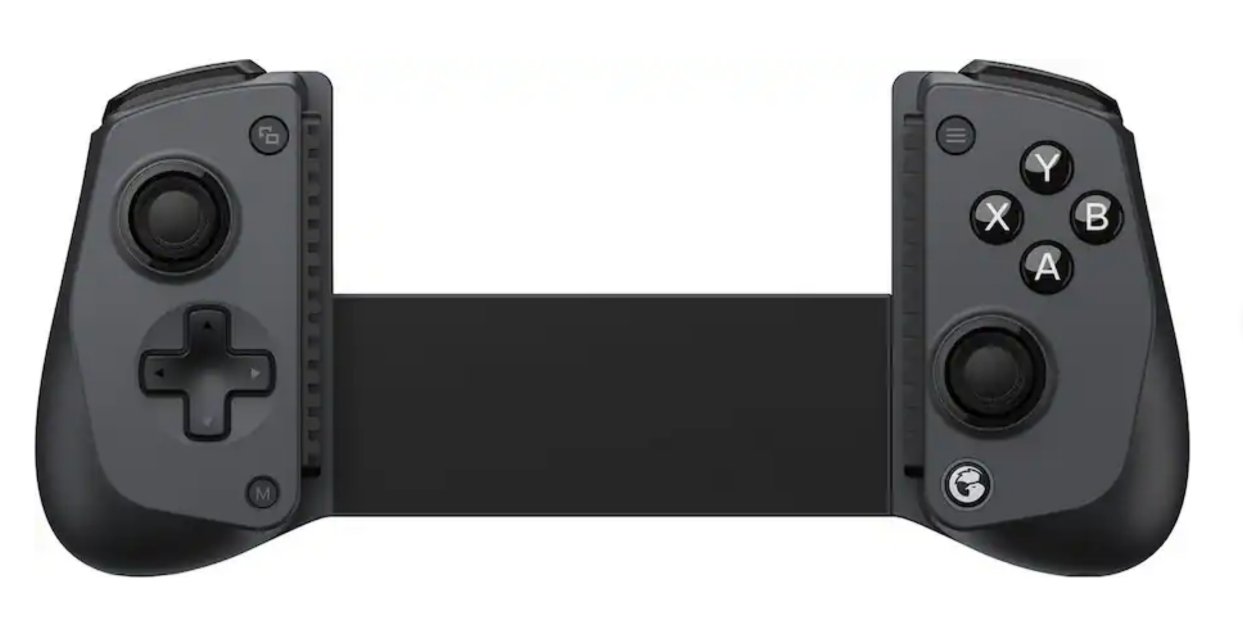
GameSir x5s
GameSir x5sExternal Links
White Chicken Light
- A Solid white chicken light Does not indicate mode.
- It only means you are connected.
- When first pairing Yellow or blue fast blinking indicate android or xbox modes pairing modes.
- Once connected it just goes solid white. This is dum to indicated connected in some mode.
- The only way to tell what mode you are in once connected:
- Open your phone's Bluetooth menu.
- Look at your connected devices list.
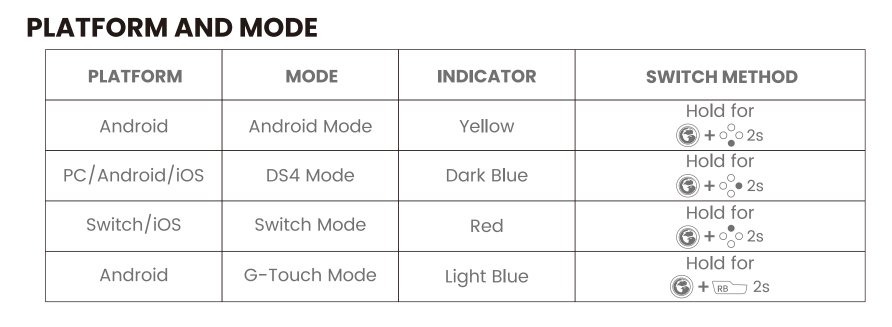
- If it says "GameSir-X5s", you are in Android Mode.
- If it says "Wireless Controller" or "DualShock 4 Wireless Controller", you are in Xbox/Console Emulation Mode
Right Analong Trigger Problem
- While gaming select button was auto cycling through retroarch shaders without holding down trigger
- In Mame, mame menu kept auto popping up without pressing or doing anything on the controller
- To fix I installed game sir app on android to check for firmware update
- There is NO firmware update as of 2026-07-26
- The joytstick test however showed right analog trigger going from 0-2 flipping every millisecond
- The app says a 5 should register but clearly that's a lie
- I had to click the right analog trigger a bunch of times to get it to calm down
- This is the problem with magents. A small shift in the plastic can move the position
- I do not know how to recalibrate
- The app was useless for this
- ALso with the app running the joystick refused to work in game
- I had to close the app and re-pair thne controller to get the controller to work again
- The app was only useful in checking the random on off right analong triggerr
- I am concerned now about reliability in this controlller
Info
- The Logo Button is NOT the pairing button.
- The button on the bottom right corner is the pairing button
- Press and hold the Home button (Chicken logo button) to turn on or wake up.
- Press and hold the Home button (Chicken logo button) for 10 seconds to turn off.
- Pairing Mode: Press and hold the pairing button on the bottom right side for 2 seconds (light will flash yellow)
- While charging breathing lighting effect.
- Press and Hold M Button check Mode through chickin color indicator.
- Press and Hold chicken and south until chicken flashes yellow rapidly for android mode
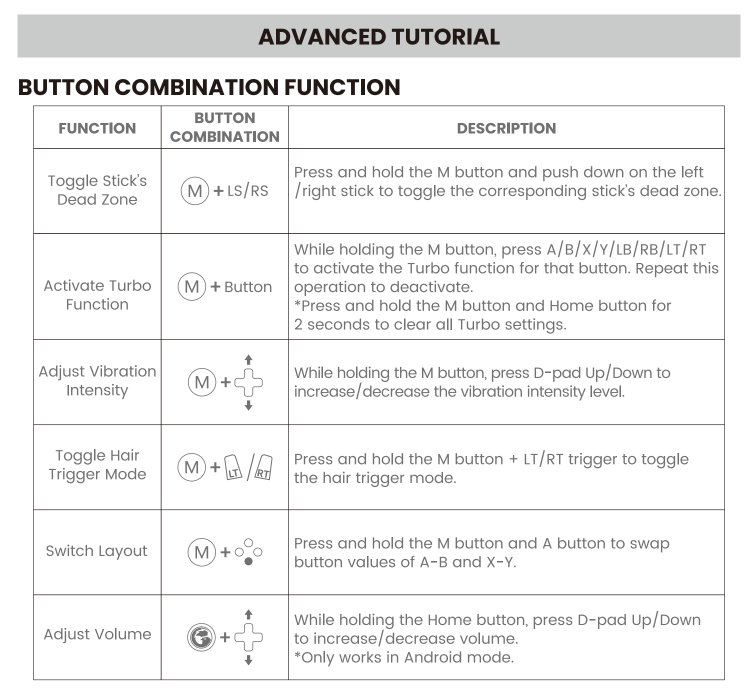
- Chicken + D-Pad Up and down controls volume in android
Specs
- Hall effect sticks
- Bluetooth 5.3
- 840mAh battery
- 6-axis gyroscope
- max device width is 8.39 inches.
- Buttons are swappable, Swapped to eastern snes style
- Comes in a nice case.
- The case holds the button swap tool.
- Also came with different rubber bumpers.
Problems
Retroarch Autoconfig
- After BT Connection
- Start retroarch no core
- Press D-Pad
- Appears as GameSir-X5s Consumer Control
- Make Autoconfig
- I copied the file local
- RetroArch\autoconfig\android\gamesikre.cfg
- I never directly set input_turbo_btn. It was there from auto laod so I assumed it's mapped to m?
Connection Modes
Advanced Button Combos