Parent Page
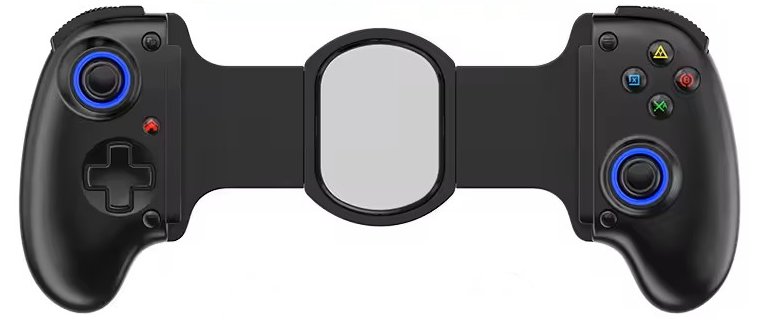
Hold the Home Button for 6 seconds to turn off the controller
The Home Button is on the bottom right face below the right stick.
BSP D10
BSP D10 42 Buacks from ali express. Bought it because supposedely one of the widest (10.24 Inches) affordable mobile controllers. It still does not fit the Amazon fire tab!External Links
Info
- Hall Effect joysticks
- Hall Effect triggers
- Bluetooth 5.2
- Android 6 or greater.
- 400mAh battery
- Max width 10.24 Inches
Pairing in Android Standard Mode
Press and Hold the West Blue Square - X Button, then press Home (Middle Left Button). This will enter Pairing in Android Standard Mode. Status Indicator blinks Ornage. Will go solid Orange once connected. If it's red you clicked the wrong Green South A - X Button.Button Labels
Left Vertical Cluster- Top Select (Symbols is Two Squares)
- Middle referred to as Home in the manual but the symbol is Power.
- Bottom Left Turbo Button (Symbol is T for Turbo)
- Top Start (Symbols is 3 Horizontal Lines)
- Bottom Right Programming Keys Button (Symbol is + for Adding Macro)
Programming Keys Button
Bottom Right + Button. You can use it to map a single button or record a complex string of moves (like a fighting game combo) directly onto a back paddle without needing any external software:Enter Programming Mode: Press and hold the Programming Key and then press either M1 or M2. The controller's indicator light will start flashing rapidly to show it is recording.Input your Combo: Press the sequence of buttons you want to save (for example: A, then B, then X). It will record the exact order you press them.Save your Layout: Press the M1 or M2 paddle again. The indicator light will stop flashing and stay solid, confirming your macro is savedTurn On/Off
Hold the Home Button for 3 seconds to turn on the controllerHold the Home Button for 6 seconds to turn off the controller
The Home Button is on the bottom right face below the right stick.
Pairing
For Standard Android: Hold X + HOME (or A + HOME). It would not pair with new device until I unpaired with old device. WTF is wrong with BT? There should be a forget pairing button on all BT Devices. X + Home would NOT enter pairing mode for me while old device was on and paired.Turbo Function
A + The Star button button (bottom left face below D-PAD) Turns on Turbo Mode. Turbo light indicator will go on. A + The Star button button (bottom left face below D-PAD) Turns off Turbo Mode. Turbo light indicator will go off. There also an auto turbo mode whatever that means? A+Star X 2 presses.P1/P2 Buttons
Are on back of controller. P1 + A + Star means A is mapped to P1. P1 + Star means null is mapped to P1. Not a fan of the buttons on back of controller. Will probably never use.Problems
Retroarch Autoconfig
- After BT Connection
- Start retroarch no core
- Press D-Pad
- Appears as ?
- Make Autoconfig
- I copied the file local
- RetroArch\autoconfig\android\gamesikre.cfg